
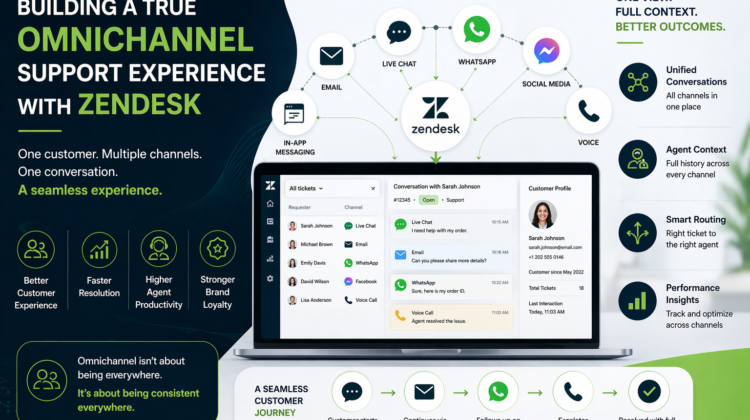
Building a True Omnichannel Support Experience with Zendesk
The Problem: Disconnected Customer Conversations
Today’s customers don’t stick to one channel.
They might:
- Start a conversation on chat
- Follow up via email
- Escalate on WhatsApp or phone
But in many businesses, these interactions remain disconnected.
The result?
- Customers repeat the same issue multiple times
- Agents lack context across channels
- Support becomes fragmented and inefficient
When your channels don’t talk to each other, your customer experience breaks down.
What Omnichannel Support Actually Means
Omnichannel support isn’t about being present on every platform.
It’s about:
👉 Delivering a consistent, connected experience across all channels
With Zendesk, this means:
- All conversations flow into a single system
- Customer history is unified
- Agents have full visibility regardless of channel
Omnichannel is more about being consistent everywhere for brand growth.
The Core Channels in a Zendesk Omnichannel Setup
1. Email Support
Still the backbone of many support operations.
Zendesk enables:
- Structured ticketing
- Automated responses
- SLA tracking
👉 Best for detailed, non-urgent issues
2. Live Chat & Messaging
For real-time engagement:
- Instant responses
- Website chat widgets
- In-app messaging
👉 Best for quick queries and conversions
3. WhatsApp & Social Channels
Customers increasingly prefer messaging platforms.
Zendesk allows integration with:
- Facebook Messenger
- Other social channels
👉 Best for conversational, ongoing support
4. Voice Support
For complex or high-priority issues:
- Call handling within Zendesk
- Call-to-ticket conversion
- Recording and tracking
👉 Best for critical customer interactions
What Makes Omnichannel Work (And What Breaks It)
✔ Unified Ticketing System
Every interaction, no matter the channel, should:
- Create or update a single ticket
- Maintain conversation continuity
✔ Intelligent Routing
Tickets should be routed based on:
- Channel
- Issue type
- Customer priority
✔ Agent Context & Visibility
Agents must be able to see:
- Previous conversations across channels
- Customer history and sentiment
✔ Consistent Experience
The tone, speed, and quality of support should remain:
👉 The same across all channels
Common Omnichannel Mistakes
❌ Treating Channels Separately
Running email, chat, and WhatsApp as separate systems creates:
- Data silos
- Inconsistent responses
❌ No Routing Strategy
Without proper routing:
- Tickets get delayed
- Agents get overwhelmed
❌ Lack of Reporting Across Channels
If you can’t measure performance across channels:
- You can’t optimize your support
❌ Overcomplicating the Setup
Trying to enable every channel at once without a plan leads to:
- Poor adoption
- Broken workflows
Omnichannel success depends on strategy, not just activation.
A Real-World Omnichannel Flow
Here’s how a well-designed Zendesk omnichannel system works:
- Customer initiates chat on website
- Conversation continues via email
- Escalation happens over call
- All interactions are logged under one ticket
- Agent sees full history instantly
👉 Result: Seamless experience for the customer
Business Impact of Omnichannel Zendesk
When implemented correctly:
- Faster resolution times
- Improved customer satisfaction
- Better agent productivity
- Reduced customer effort
- Stronger brand perception
And most importantly:
👉 Customers feel understood; no matter where they reach out
When Should You Move to Omnichannel?
You should consider it if:
- You support customers across multiple channels
- Customers repeat issues frequently
- Your teams lack visibility across interactions
- You want to improve customer experience at scale
These are clear signs your current setup is fragmented.
Why Omnichannel Requires Proper Implementation
Zendesk provides the capability—but execution is everything.
A successful setup requires:
- Channel strategy and prioritization
- Workflow and routing design
- Integration across communication platforms
- Data consistency and reporting
- Continuous optimization
Without the right architecture, omnichannel becomes multi-channel chaos.
📞 Looking to Implement Omnichannel Zendesk Support?
Target Integration specializes in designing and delivering Zendesk-based solutions that align with real business needs and support operations.
Our expertise includes:
- Omnichannel Zendesk setup (email, chat, voice, messaging)
- Workflow automation and intelligent routing
- CRM and third-party integrations
- Zendesk optimization and scaling strategies
- Custom API development and advanced implementations
If you’re looking to unify your customer communication channels and deliver a seamless support experience, we can help you design and implement an omnichannel system tailored to your business.
Connect with us to take the next step toward a more connected, efficient, and customer-centric support model.