
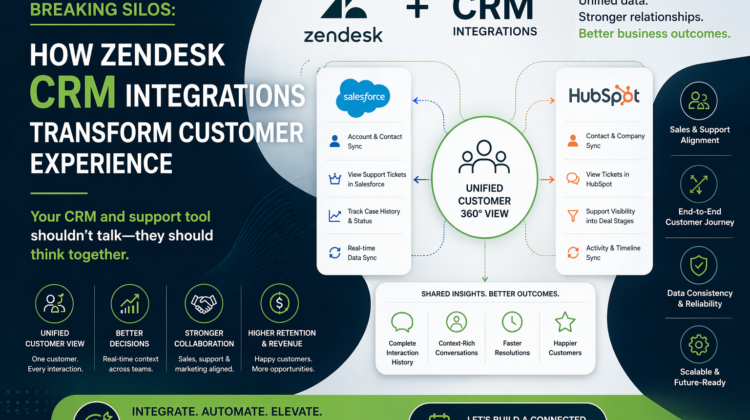
How Zendesk CRM Integrations Transform Customer Experience
The Problem: Fragmented Customer Data
In most organizations, customer data lives in multiple systems.
- Sales teams work in CRM
- Support teams work in Zendesk
- Marketing teams track engagement separately
The result?
- Sales has no visibility into customer issues
- Support has no context of deals or revenue
- Customers repeat themselves across teams
This fragmentation doesn’t just slow operations—it directly impacts customer experience and revenue.
What Zendesk CRM Integration Actually Solves
Integrating Zendesk with your CRM bridges the gap between support and revenue teams.
Instead of disconnected tools, you get:
- A unified customer profile
- Shared visibility across teams
- Better collaboration between sales and support
Your CRM and support tool shouldn’t talk—they should think together.
Popular Zendesk CRM Integrations
Zendesk + Salesforce
One of the most widely adopted integrations.
When Zendesk is connected with Salesforce:
- Support tickets are visible inside Salesforce
- Sales teams can view customer issues in real time
- Customer records stay synchronized
👉 Result: Sales teams engage with full customer context
Zendesk + HubSpot
A powerful combination for growing businesses.
With HubSpot integration:
- Contacts and tickets are automatically linked
- Deal stages can be accessed by support teams
- Customer interactions are unified
👉 Result: Better alignment between marketing, sales, and support
High-Impact Use Cases
1. Sales Visibility into Support Issues
Without integration:
- Sales teams approach customers blindly
With integration:
- They can see open tickets, past issues, and satisfaction levels
👉 Result: More informed conversations and higher conversion rates
2. Support Visibility into Deal Stages
Support teams often lack context about:
- Customer value
- Deal stage
- Renewal timelines
With integration:
- High-value customers can be prioritized
- Escalations can be handled faster
👉 Result: Better retention and proactive support
3. Unified Customer Journey
Integration allows you to:
- Track interactions across sales and support
- Understand the full lifecycle of a customer
- Identify upsell and cross-sell opportunities
👉 Result: Data-driven growth strategies
Technical Considerations (Where Expertise Matters)
This is where most integrations fail—not in concept, but in execution.
Key Factors to Get Right:
- Data Mapping
Ensuring fields between Zendesk and CRM align correctly
- Sync Logic
Deciding what data flows where—and when
- Trigger-Based Updates
Automating updates across systems without conflicts
- Performance & Scalability
Handling large volumes of tickets and records
- Error Handling & Monitoring
Ensuring integrations don’t silently fail
Integration is not just about connecting systems—it’s about designing how they behave together.
Common Mistakes to Avoid
- Treating integration as a one-time setup
- Syncing too much or too little data
- Ignoring business workflows during implementation
- Lack of ownership across teams
- No monitoring or optimization
These mistakes lead to:
- Data inconsistencies
- Broken workflows
- Poor user adoption
What a Well-Integrated System Looks Like
When done right, your Zendesk + CRM integration becomes:
- Seamless and invisible to users
- Real-time and reliable
- Aligned with business workflows
- Scalable for future growth
Resulting in:
- Better collaboration between teams
- Faster decision-making
- Improved customer experience
- Higher retention and revenue
When Should You Consider Integration?
You should explore Zendesk CRM integration if:
- Your teams operate in silos
- Customer data is scattered
- Sales lacks visibility into support
- Support lacks customer context
- You’re scaling operations and need alignment
These are clear indicators that your systems need to work together—not separately.
📞 Looking to Implement a Zendesk + CRM Integration?
Target Integration specializes in designing and delivering Zendesk-based solutions that align with real business needs and support operations.
Our expertise includes:
- Zendesk implementation and optimization
- CRM integrations (Salesforce, HubSpot, and more)
- Workflow and automation design across systems
- Omnichannel support setup
- Custom API development and advanced integrations
If you’re looking to break silos, unify customer data, and enable your teams to work more efficiently, we can help you design and implement a seamless integration tailored to your ecosystem.
Connect with us to take the next step toward a more connected, intelligent, and customer-centric support model.