Zendesk SLA Management & Escalation Automation: Improving Response Times and Service Efficiency
In today’s customer-centric business environment, support speed and service consistency directly impact customer satisfaction and brand loyalty. Customers expect quick responses, timely resolutions, and proactive communication across every support interaction.
However, many organizations struggle with delayed responses, missed follow-ups, inconsistent escalations, and lack of visibility into support performance. As ticket volumes increase, managing support operations manually becomes increasingly difficult and inefficient.
At Target Integration, we help businesses optimize customer support operations by implementing scalable SLA management and escalation automation frameworks within Zendesk.
By automating service workflows, prioritization, and escalations, organizations can improve response times, enhance operational efficiency, and deliver consistent customer experiences at scale.
The Challenge: Managing Support Operations Without SLA Automation
Before implementing SLA and escalation automation, organizations commonly face several operational challenges:
Delayed Customer Responses
Without structured SLA tracking:
- Tickets remain unattended
- High-priority issues are delayed
- Customers experience long wait times
This terribly affects customer satisfaction and trust.
Inconsistent Escalation Processes
Manual escalation management often results in:
- Missed escalations
- Delayed internal coordination
- Lack of accountability
- Unresolved critical issues
Difficulty Prioritizing Tickets
Support teams struggle to identify:
- Urgent cases
- VIP customers
- Business-critical issues
- Escalation risks
This creates operational inefficiencies.
Limited Visibility into Support Performance
Management teams lack visibility into:
- SLA compliance
- Agent response times
- Ticket aging
- Escalation trends
- Operational bottlenecks
Without accurate reporting, process optimization becomes difficult.
Increasing Operational Complexity
As support operations scale:
- Manual monitoring becomes unsustainable
- Ticket backlogs increase
- Team productivity decreases
- Customer experience becomes inconsistent
The Objective: Build a Scalable SLA & Escalation Framework in Zendesk
The goal of implementing SLA management and escalation automation is to create a structured, measurable, and proactive support environment within Zendesk.
A well-designed solution should:
- Automatically track response and resolution times
- Prioritize tickets intelligently
- Trigger escalations proactively
- Improve accountability
- Optimize support workflows
- Enhance customer experience
- Provide real-time operational visibility
The Solution: Zendesk SLA Management & Escalation Automation
At Target Integration, we implement customized Zendesk SLA and escalation frameworks designed to align with business support processes and operational goals.
Our solutions help businesses automate ticket monitoring, improve prioritization, and ensure timely support delivery through intelligent workflows and real-time tracking.
This enables organizations to ensure that every support request is:
👉 Prioritized
👉 Monitored
👉 Escalated
👉 Tracked
👉 Resolved
within a centralized and automated Zendesk support ecosystem.
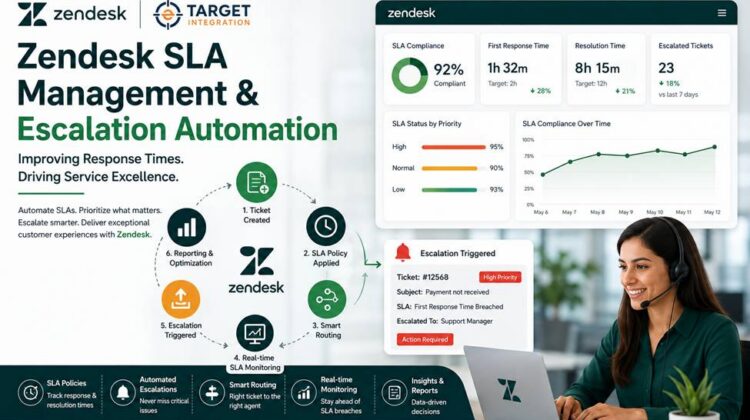
How Zendesk SLA Management & Escalation Automation Works
The implementation is designed to optimize the complete support ticket lifecycle.
Step 1: Ticket Creation & Categorization
Support tickets are generated from multiple channels including:
- Live Chat
- Web Forms
- Social Media
- Help Center requests
Tickets are automatically categorized based on:
- Priority
- Issue type
- Department
- Customer segment
- Business rules
Step 2: SLA Policy Assignment
Zendesk automatically applies SLA policies based on:
- Ticket priority
- Support category
- Customer type
- Business hours
- Service agreements
This ensures structured response and resolution tracking.
Step 3: Automated Ticket Routing
Using workflow automation:
- Tickets are assigned to the correct teams
- High-priority issues are routed faster
- Specialized departments receive relevant cases
This improves operational efficiency and reduces delays.
Step 4: Real-Time SLA Monitoring
Zendesk continuously tracks:
- First response times
- Next reply times
- Resolution deadlines
- Ticket aging
- Pending escalations
This enables proactive issue management.
Step 5: Intelligent Escalation Automation
If SLA conditions are at risk or breached:
- Automated escalations are triggered
- Notifications are sent to managers
- Priority levels can be updated
- Internal follow-ups are initiated
This minimizes missed deadlines and improves accountability.
Step 6: Reporting & Performance Analysis
Management teams gain visibility into:
- SLA compliance
- Escalation trends
- Agent productivity
- Response efficiency
- Operational bottlenecks
This supports continuous service optimization.
Key Features Implemented
SLA Policy Management
Configure SLA policies for:
- First response time
- Next response time
- Resolution time
- Business hours
- Priority-based support
Automated Escalation Workflows
Automatically escalate tickets based on:
- SLA breaches
- Ticket aging
- Customer priority
- Business-critical conditions
Intelligent Ticket Routing
Automatically assign tickets based on:
- Departments
- Skills
- Availability
- Ticket categories
- Business rules
Real-Time SLA Tracking
Monitor ticket performance and response metrics continuously within Zendesk.
Priority-Based Support Operations
Ensure critical tickets receive immediate attention and faster resolution.
Internal Notifications & Alerts
Trigger automated notifications for:
- Escalation events
- SLA breaches
- Manager approvals
- Pending actions
Reporting & Analytics Dashboards
Track and analyze:
- SLA compliance rates
- Escalation frequency
- Agent performance
- Ticket handling efficiency
- Support trends
Business Impact: From Reactive Support to Proactive Service Operations
Organizations typically experience major operational improvements after implementing Zendesk SLA automation.
Faster Response & Resolution Times
Automated monitoring ensures tickets are addressed before SLA breaches occur.
Improved Customer Satisfaction
Customers benefit from:
- Faster responses
- Better communication
- Timely issue resolution
- Consistent support experiences
Increased Agent Productivity
Automation reduces manual monitoring and administrative overhead.
Better Operational Visibility
Management gains actionable insights into support performance and team efficiency.
Reduced Escalation Delays
Automated escalation workflows improve accountability and issue resolution speed.
Scalable Support Operations
Businesses can handle growing ticket volumes without compromising service quality.
Why SLA Management & Escalation Automation Matters
Modern customer support ought to maintain speed, accountability, and operational consistency.
Without structured SLA management:
- Tickets become difficult to prioritize
- Escalations are delayed
- Customer experiences become inconsistent
- Operational visibility remains limited
By implementing SLA management and escalation automation within Zendesk, businesses can create a highly efficient and scalable support ecosystem.
Extending Zendesk Automation Beyond the Basics
Once the core SLA framework is implemented, organizations can expand capabilities further.
AI-Powered Ticket Prioritization
Use AI to identify critical tickets and predict escalation risks.
Omnichannel Support Automation
Integrate support across:
- Live Chat
- Social Media
- Voice support systems
Advanced Workflow Automation
Automate:
- Internal approvals
- Follow-up sequences
- Customer notifications
- Escalation hierarchies
Self-Service & Knowledge Base Integration
Reduce ticket volumes through intelligent self-service support systems.
Custom Dashboards & Reporting
Build real-time operational dashboards customized to your business KPIs.
When Should You Consider Zendesk SLA Automation?
This solution is ideal for you if you:
- Manage high support ticket volumes
- Struggle with delayed responses
- Need structured escalation processes
- Want better SLA compliance
- Require operational visibility
- Need scalable support workflows
If your support operations rely heavily on manual ticket monitoring and escalation handling, implementing Zendesk SLA automation can deliver significant operational improvements.
Conclusion
Customer support performance directly impacts customer trust, retention, and business growth.
By implementing Zendesk SLA management and escalation automation, organizations can move from reactive support operations to a proactive, structured, and highly scalable service model.
At Target Integration, we help businesses design and implement Zendesk solutions that improve operational efficiency, streamline support workflows, and enhance customer experiences through intelligent automation.
Looking to Optimize Your Zendesk Support Operations?
Target Integration specializes in:
- Zendesk Implementations
- SLA Management Frameworks
- Escalation Automation
- Omnichannel Support Solutions
- Workflow Automation
- AI-Powered Customer Support
- Custom Integrations & Reporting
If you’re looking to improve response times, automate escalations, and build scalable support operations with Zendesk, we can help you design and implement a solution tailored to your business needs.
Connect with our team to transform your customer support operations with Zendesk automation.