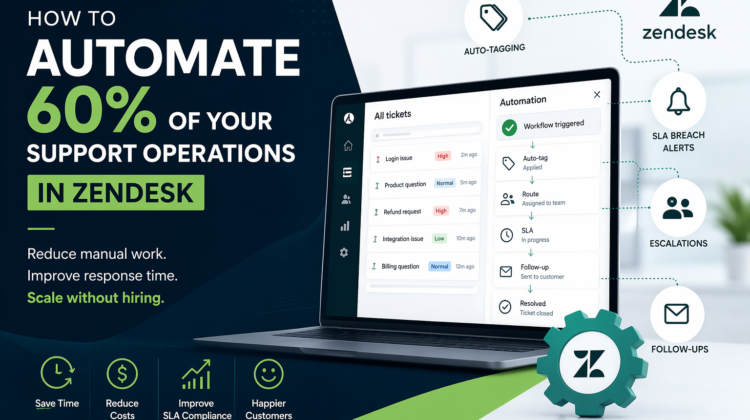
How to Automate 60% of Your Support Operations in Zendesk
The Hidden Cost of Manual Support
Many support teams believe their biggest challenge is volume.
But in reality, the real issue is manual effort.
Agents spend hours:
- Assigning tickets
- Tagging issues
- Following up with customers
- Escalating cases manually
This doesn’t just slow things down—it increases costs and limits your ability to scale.
The more manual your support operations are, the more expensive and inconsistent they become.
Well, hiring more agents isn’t a long-term solution.
What Zendesk Automation Actually Enables
Zendesk isn’t just a ticketing tool; it’s a workflow engine.
With the right setup, you can automate:
- Ticket classification
- Routing and prioritization
- SLA tracking
- Customer communication
This allows your support team to shift from reactive work → structured operations.
Automation is not a feature but an operating model.
The Core Automation Capabilities You Should Be Using
1. Auto-Tagging & Smart Categorization
Instead of relying on agents to tag tickets manually:
- Zendesk can identify keywords and auto-apply tags
- Tickets can be categorized based on issue type
- Data becomes structured and reportable
👉 Result: Better insights, cleaner reporting, and faster routing
2. SLA Breach Alerts (Before It’s Too Late)
Missing SLAs damages customer trust.
With automation:
- Alerts are triggered before breaches
- Priority is adjusted dynamically
- Escalations happen automatically
👉 Result: You stay proactive instead of reactive
3. Intelligent Escalation Workflows
Not all tickets should be treated equally.
Zendesk allows:
- Automatic escalation for high-priority tickets
- Reassignment to senior agents
- Internal notifications to stakeholders
👉 Result: Critical issues are handled instantly
4. Automated Customer Follow-Ups
One of the most common gaps in support is missed follow-ups.
Automation ensures:
- Customers receive timely updates
- Pending issues don’t go cold
- Resolution cycles stay active
👉 Result: Higher customer satisfaction with zero extra effort
A Real-World Workflow Blueprint
Here’s what a typical automated workflow looks like:
- Ticket is created via email or chat
- System auto-tags based on keywords
- Ticket is routed to the correct team
- SLA timer starts automatically
- Alerts trigger before SLA breach
- If unresolved → auto-escalation
- Follow-up sent if customer is inactive
No manual intervention required.
This is what a self-operating support system looks like.
ROI: What Automation Actually Delivers
When implemented correctly, Zendesk automation can:
- Reduce manual workload by 40–60%
- Improve response and resolution times
- Minimize human error
- Delay or eliminate the need to hire more agents
Example Scenario:
If your team handles 1,000 tickets/month:
- Even a 50% automation rate = 500 tickets handled with minimal effort
- That’s significant cost savings and efficiency gain
Why Most Automation Setups Fail
Despite the potential, many businesses struggle because:
- Automations are added without strategy
- Triggers conflict with each other
- Workflows are overly complex
- There’s no clear ticket lifecycle
Automation without structure creates confusion—not efficiency.
What a Well-Designed Automation System Looks Like
A scalable Zendesk automation setup includes:
- Clearly defined workflows
- Structured trigger and automation logic
- SLA-aligned processes
- Clean data and tagging strategy
- Room to scale as volume grows
This is where most businesses need expert guidance—not just configuration.
When Should You Consider Automation Optimization?
You should revisit your Zendesk setup if:
- Your team spends too much time on repetitive tasks
- SLAs are frequently missed
- Support costs are increasing
- Scaling requires hiring more agents
- Your workflows feel inconsistent or manual
These are clear signs your system isn’t optimized.
📞 Looking to Implement a Scalable Zendesk Automation System?
Target Integration specializes in designing and delivering Zendesk-based solutions that align with real business needs and support operations.
Our expertise includes:
- Zendesk implementation and optimization
- Workflow automation (triggers, SLAs, and escalation design)
- CRM and third-party integrations
- Omnichannel support setup (email, chat, voice, messaging)
- Custom API development and system integrations
If you’re exploring ways to reduce manual effort, improve response times, and scale your support operations without increasing costs, we can help you build a Zendesk automation system tailored to your business.
Connect with us to take the next step toward a more efficient, automated, and scalable support model.